


RockIn Rock&Meteorite Identify
4.4217.00 Reviews
App Specs
- Version
- 1.19.1
- Updated On
- License
- Free
- Downloads
- 100,000+
- Developer
- PlantIn
- Categories
- Lifestyle
- Platform
- Android
Screenshots
 Analysis by AppCompare
I like using a rock-identification app best when it helps me slow down and look more carefully, rather than treating a quick guess as a scientific conclusion. RockIn Rock & Mineral Identify is aimed at that curious moment when you find a stone and want a starting point for learning about it. It is a free Lifestyle app from PlantIn, and its focus on identifying, collecting, organizing, exploring, and trading gives it a broader purpose than a one-off photo lookup.
Where the first attempt can go wrong
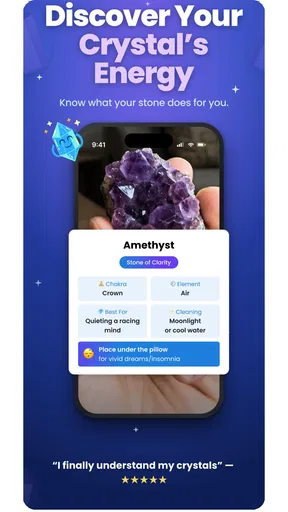
The simplest route is to take a photo or choose one from your gallery, but the result is only as useful as the image you give it. A wet stone, a strong shadow, a busy background, or a close crop that hides the specimen’s shape can make visual comparison harder. I’d begin with a clean, well-lit image that shows the whole rock, then take another closer photo if its surface has a distinctive pattern or crystal structure.
That small bit of care matters because a picture can make different minerals look alike. Color is especially easy to misread under warm indoor lighting or when a phone camera boosts contrast. If the suggested identification feels too certain for an oddly colored or unusually textured sample, I would treat it as a lead and compare the description with what I can actually see, rather than assuming the first answer settles the question.
For a useful field habit, photograph the specimen before moving it and keep a second image that shows its scale or surroundings. The extra context can help you remember why the find caught your eye later, even if the identification itself needs another look. I also avoid relying on a single photograph to distinguish minerals with similar appearances; a second angle is a low-effort way to check whether the first image concealed important details.
Setup checks before you head out
Before using the app on a walk, I’d open it at home and try a photo from the gallery. That gives you a chance to understand the basic flow while you have a stable connection and time to read the result. If you plan to use the offline database, check that the material you want to consult is available before leaving; an offline reference is useful, but it should not be confused with every part of an app necessarily working without a connection.
It is also worth checking that the app is current and that your device meets its minimum operating-system requirement. The current release is version 1.8.0, and the minimum OS is 7.0. Those details are practical checks if installation or launching is the problem, rather than evidence that a particular identification feature is malfunctioning.
The app is free to install and is rated for Everyone, with in-app purchases ranging from $4.99 to $59.99 per item. I’d explore the basic experience before deciding whether any paid option is relevant to me. If a purchase prompt appears, take a moment to read what it applies to and whether it is something you actually want; there is no need to buy anything just to satisfy curiosity about a rock.
Worth Reading Before You Choose

Flipboard Shows What News Apps Must Do Beyond the Feed

Switching to Android Auto Means Rethinking Your Driving Routine

Google Calendar Makes a Crowded Week Easier to Manage

Ludo King Makes the Most of the Minutes Between Plans

Baby Panda World Brings Quick Play to Modern Phones, but Its Game Library Feels Busy

ESPN’s Live Game View Makes Following Close Games Easier
Making the app useful beyond a single identification
I’d use this section to think about what makes a saved specimen genuinely useful weeks later: not just its suggested name, but the photos and observations that let me reassess it. I’ll also look at how a collection can support a small, repeatable learning habit, so each new find sharpens the next identification rather than becoming another forgotten entry.
A collection works best when you add context
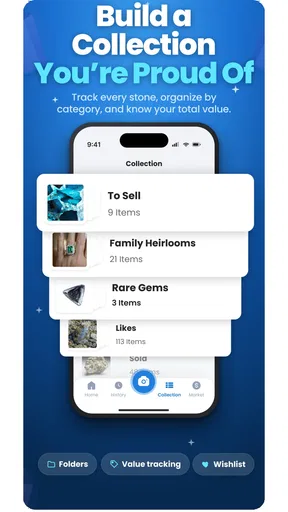
Saving a find is more valuable when the note records something you will forget: where you found it, what the surface looked like before it dried, or why you thought it was unusual. A collection organized only around names can become a shelf of guesses. I’d use albums or notes to distinguish confirmed pieces from specimens I still want to investigate, and keep the original photos with the entry so I can revisit the evidence instead of trusting my memory.
This is especially helpful for families or students collecting samples over time. A child can make the initial guess, while an adult adds a note about what remains uncertain. That turns the app into a record of questions as well as answers. It also makes a later comparison more rewarding: two stones that looked similar on a trail may have different textures or contexts once you review the pictures side by side.
Use learning tools as a second pass
The learning section, with articles and quizzes, gives me a reason to return after the initial identification. I’d use it to build vocabulary around what I’m seeing, then go back to a saved specimen and see whether I can describe it more carefully. That is a better use of a quiz than treating a score as proof of expertise. The useful payoff is noticing details—such as texture or visible structure—that I might have overlooked while taking the first picture.
The offline database can also serve as a reference when reception is poor, but I would prepare rather than wait until I am standing somewhere remote to find out what is available. Download or open the relevant material while connected, and keep the app’s role modest: it can support exploration, while a field guide or an expert’s assessment may be a better choice when an exact identification matters.
When a community or map adds value
Community advice is most useful when you share a clear image and a short description of the circumstances, not just a label you want confirmed. Mentioning that the sample was found on a beach, trail, or construction site can give other enthusiasts a better starting point. I would still compare replies with the app’s information and my own observations, since a friendly discussion is not the same as a formal mineral analysis.
Location-based rock maps can help turn a general interest into a plan for a day out. I’d use them as inspiration rather than a guarantee that a particular spot will produce a find. Check that access is permitted, respect private property and local rules, and avoid disturbing protected areas. If the map does not match what is accessible or suitable for your outing, a local guide or a conventional map is the more dependable planning tool.
A realistic outing, from photo to follow-up
Imagine finding a patterned pebble during a weekend walk. I would first take a broad photo with the stone in view, then a close-up in even light, and use the identification result as a short list of possibilities. After the walk, I could save the images, add where I found it, and compare the surface with the app’s reference material. If I remain unsure, I can ask the community with those details rather than posting a bare image and expecting a definitive answer.
That workflow also avoids a common frustration: trying to solve everything while standing in a windy spot with a low battery and patchy reception. The app can make the moment more engaging, but there is no reason to rush. Taking the photographs and recording a note first means I can continue the investigation later, when I can see the specimen clearly and read at my own pace.
How it compares with familiar alternatives
A printed field guide is slower to search, but it can encourage careful comparison and does not depend on a phone screen. A general image-search tool may surface many visually similar stones without organizing the result around a dedicated mineral-collecting routine. RockIn’s appeal is the combination of image identification with collection tools, learning material, community interaction, and maps. That breadth is convenient if I want one place to keep the hobby moving, though it may feel unnecessary if I only need an occasional reference.
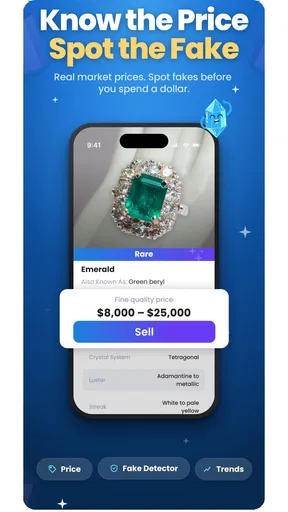
For serious identification, neither a photo-based suggestion nor a community comment should replace appropriate specialist testing. A picture cannot show every property that may matter, and visual similarity can be misleading. I’d use the app to narrow my curiosity and decide what to investigate next, not to make high-stakes claims about a specimen’s composition or value.
Why RockIn is Your New Exploration Buddy
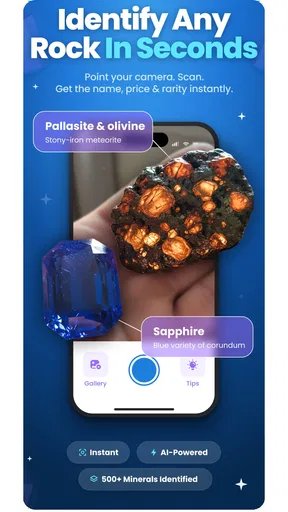
Right off the bat, the first thing you’ll notice about RockIn Rock & Mineral Identify is its user-friendly interface. It’s clean, straightforward, and doesn’t bombard you with a ton of ads, which is a major plus in my book. You open the app, and you’re greeted with a simple option to either take a photo or upload one from your gallery. Easy peasy.
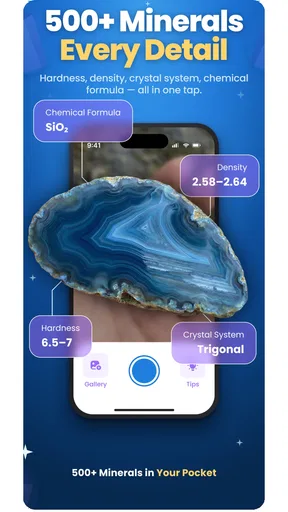
Once you snap a pic of your mysterious rock, the app gets to work. Using AI technology, it analyzes the image and gives you detailed information about the rock's composition. It’s like magic, but it’s science! This feature is super handy when you’re out in the field and want immediate results without flipping through a textbook.
Features That Rock (Pun Intended)
Aside from the photo identification feature, RockIn offers a ton of other nifty tools. There’s a comprehensive database that you can access even when you’re offline. So, if you’re venturing into the wild with no signal, no worries. You’ve still got a wealth of information at your fingertips.
Another cool feature is the learning section. Whether you’re a seasoned geologist or just starting out, this section is packed with articles and quizzes to expand your knowledge. It’s a great way to kill time and learn something new. Plus, who doesn’t love a good quiz to test their rock knowledge?
Exploring the World, One Rock at a Time
One of my favorite aspects of the app is its community feature. You can connect with other rock lovers, share your discoveries, and even get advice from more experienced users. It’s like a social network for geology geeks. This not only makes the app more engaging but also helps you learn from others’ experiences.
The app also provides location-based rock maps, which is like having a treasure map in your pocket. These maps show you popular rock hunting spots nearby. Perfect for planning your next adventure!
The Little Things That Matter
Now, let's talk about some of the smaller, yet impactful features. I love the option to save and organize your rock collection within the app. You can create albums, add notes, and even track the origin of each find. It’s these little touches that elevate the user experience.
One thing I did notice is that while the app is pretty accurate, it’s not 100% foolproof. Sometimes, especially with less common minerals, you might get a few different possibilities. But honestly, for a free app, the accuracy is quite impressive. Plus, they’re constantly updating the database, so it’s only going to get better.
Who will get the most from it
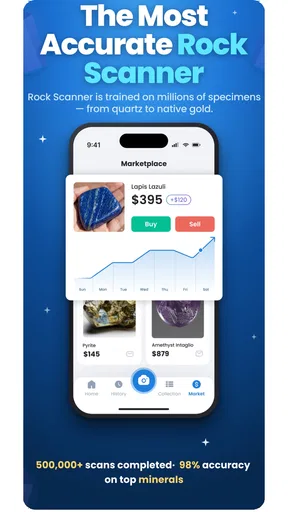
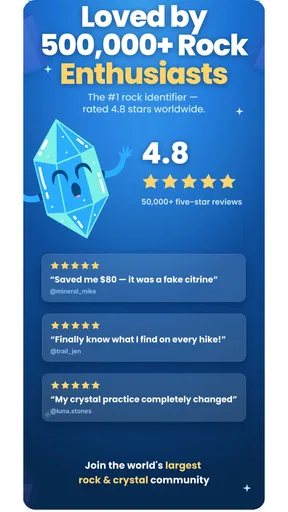
With an average rating of 4.1 from around 683 ratings, and over 10,000 installs, RockIn has found an audience among people who enjoy identifying and keeping track of finds. I can see it suiting casual collectors, families who want a shared outdoor activity, and beginners who would rather start with a photo than carry a technical reference book. PlantIn’s app is also an appealing fit for someone who wants a hobby space that combines identification with ongoing learning.
I would skip it if I wanted a rigorous scientific determination from a phone photo, or if I rarely collect rocks and only need a quick answer once in a while. It may also be a poor fit for someone who prefers paper notes and a physical guide, or who does not want collection and community features around a simple lookup. In those cases, a library field guide or advice from a local rock and mineral group may suit the task better.
The release date is January 9, 2026, and the app is marked for Everyone. Those points make it approachable for a broad audience, but the best use still depends on expectations: it is a hobby companion, not a substitute for professional testing or a guarantee that every visual identification will be right.
When a problem may be outside the app
If a photo result seems unhelpful, I would first retake the image in neutral daylight, move the stone away from distracting objects, and try a second angle. If the app itself will not open or a screen fails to load, I’d close and reopen it, check the device’s connection, and confirm that the operating system meets the minimum requirement. These are ordinary troubleshooting steps, not proof that a particular feature is broken.
Likewise, a missing map result does not necessarily mean there are no suitable places nearby, and an uncertain community response does not settle a mineral’s identity. The maps are a starting point for exploration, while access and conditions need to be checked separately. Keeping those limits in mind prevents a disappointing search from turning into a mistaken conclusion about the rock or the app.
Wrapping It Up
All in all, RockIn Rock & Mineral Identify is a fantastic tool for anyone interested in geology. Whether you’re a professional, a student, or just someone who loves the outdoors, this app has something for you. It’s educational, fun, and incredibly easy to use. So next time you’re out exploring, don’t forget to take this little gem along with you. Who knows what kind of rock treasures you’ll uncover!
My practical verdict is that it works best when I use it as a notebook and learning companion as much as an identifier. I’d take a careful photo, save the context, and treat uncertain results as invitations to investigate rather than final answers. If that balanced approach sounds enjoyable, it is an easy app to try; if you need authoritative identification or a bare-bones reference, choose a specialist or simpler alternative instead.
Pros
- Accurate rock identification results.
- User-friendly interface makes it easy.
- Large database of minerals and rocks.
- Offline mode for field use.
- Educational resources included.
Cons
- Limited free version features.
- Requires stable camera for best results.
- Occasional misidentification reported.
- Heavy on battery usage.
- No community forum for discussion.
FAQs for RockIn Rock&Meteorite Identify
What is RockIn Rock & Mineral Identify app used for?
RockIn Rock & Mineral Identify is designed to help users identify various rocks and minerals using their smartphone. By taking a photo of a specimen, the app provides detailed information about its composition, type, and characteristics. It's ideal for geology enthusiasts, students, and professionals seeking a portable identification tool.
How accurate is the identification feature of RockIn Rock & Mineral Identify?
The app utilizes advanced image recognition technology and a comprehensive database to deliver high accuracy in identifying rocks and minerals. However, environmental factors such as lighting and photo quality can impact results. Users are encouraged to take clear, well-lit photos for the best accuracy. Regular updates continually improve identification algorithms.
Is RockIn Rock & Mineral Identify available for both Android and iOS?
Yes, RockIn Rock & Mineral Identify is available for download on both Android and iOS platforms. Users can find it on the Google Play Store and the Apple App Store, ensuring compatibility with a wide range of devices. It's designed to offer a seamless and user-friendly experience across both operating systems.
Does the app require an internet connection to function?
Basic identification features can work offline, but an internet connection is recommended for enhanced accuracy and access to the full database. Advanced features, such as detailed descriptions and additional resources, are typically cloud-based and require connectivity to function properly.
Are there any in-app purchases or subscriptions within RockIn Rock & Mineral Identify?
RockIn Rock & Mineral Identify offers a free version with essential features. However, there are optional in-app purchases and subscription plans available. These provide users with access to premium features such as an expanded database, ad-free experience, and more detailed analysis options, enhancing the overall functionality of the app.


